People need to work safely if they want to see long-term positive outcomes for their health and well-being
When COVID-19 happened, people were quickly sent to work from home, despite not having an ergonomically sound workstation. Many plunked down on a bed or sofa or were tethered to tables in the kitchen or dining room.
Looking to Google for tips on setting up a home office, they may have cobbled together a PBB setup (pillow/box/books). That’s a pillow on the chair or behind their back, or both, and a box or pile of books under the laptop or under their feet. Uncomfortable and possibly in pain, many workers might have made an impulse purchase of an “ergonomic” product.
Back when the pandemic first hit, 52 per cent of Canadians wanted better seating, 48 per cent were keen to have a better desk and working space and 19 per cent wanted better lighting, according to a survey by DART and Maru/Blue in the National Post.
Now, the future remains uncertain, but remote work could very well be part of the new normal for months, years or even permanently.
Embracing ergonomics
Amid this uncertainty, one thing hasn’t changed ― what the human body needs. People need to maintain good alignment as they move through various postures that support their muscular and skeletal systems to avoid strain and overexertion while working.
The long-term benefits are comfort and the elimination or reduction of injuries and chronic diseases ― in particular, chronic diseases such as heart disease, type 2 diabetes, various cancers, obesity and decreased mortality.
Enter the long game. It’s time to deliberately invest in an ergonomically sound workstation that yields benefits today and for years to come.
An ergonomically sound workstation:
- accommodates a person’s body shape and size
- allows people to move through multiple, supportive postures while maintaining their body in good alignment
- supports people and their work tools
The components of an ergonomically sound workstation typically include a chair, work surface and accessories such as a monitor arm and footrest.
Evaluating the home office setup
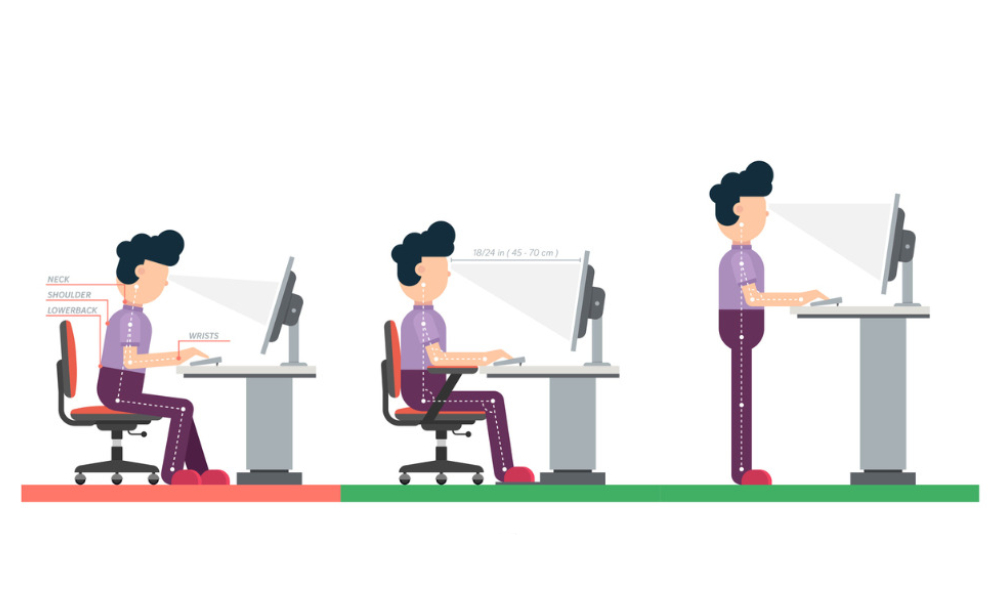
Before investing in an ergonomically sound workstation, people should evaluate their posture and movement opportunities in their existing setup. They should be able to move through postures that give them biomechanical advantages to do their work, with minimal stress on the musculoskeletal system. While it is not necessary to maintain neutral joint positions 100 per cent of the time to minimize risk, the workstation should support and allow them to frequently assume the following throughout the day:
While sitting, people should ensure:
- the soles of their feet and lower legs are roughly at 90 degrees
- their thighs are roughly parallel to the floor
- there is at least 90 degrees between their thighs and upper body; more than 90 degrees is better for the lumbar spine
- for computer tasks, the upper arms rest alongside the upper body, with shoulders relaxed, forearms horizontal, elbows close to the body, wrists straight (not bent) and the neck upright
While standing, people should ensure:
- their head, neck, upper body and legs are roughly in line and vertical ― one foot may be raised on a footrest for short periods
- for computer tasks, the upper arms rest alongside the upper body, with shoulders relaxed, forearms horizontal, elbows close to the body and wrists straight (not bent)
- Any shortcomings identified during the evaluation phase will help inform the selection of an ergonomically sound workstation.
Selecting a workstation
The chair: People should start with a seat size that is right for their physical dimensions and then look for adjustable features to fine-tune so that their body is in good alignment for maximum support and comfort, including seat depth, seat height, lumbar support height, arm rest height and lateral position.
To ensure they can move from one posture to another, purchasers should look for a tilt feature such as a synchro-tilt or multi-tilt that allows them to unlock the chair (both seat and back) so that they can gently tilt or rock to enhance blood flow.
Other features such as an independent back angle adjustment provide more movement options to go from an upright posture to one where they open the angle at the hips for greater low back comfort.
The work surface: To maximize the return on investment in an ergonomically sound chair, people need to place their work tools (equipment and materials) at appropriate heights and distances. For keyboard or input tasks, the work surface should be at the elbow height when their feet are resting on the floor. Kitchen and dining room tables as well as products labelled “computer desk” are typically fixed at a height that is too high for most women and some men to safely work on technology. A height-adjustable surface is often needed to allow them to set the work surface low enough to avoid stressing the body.
Given the need to move more, selecting a height adjustment range that covers both the seated elbow height and standing elbow height will allow people to comfortably move between sitting and standing postures. This can go a long way to help ward off the negative health outcomes of sedentary behaviour.
Workers should think about their equipment and materials and how often they use them. They should select a surface size that is wide enough and deep enough to place their work tools so that their body is properly aligned and supported. As a simple rule of thumb, the most frequently used items should be within immediate reach while occasionally or rarely used items should be at arm’s distance or further away.
Accessories: It may be necessary for workers to add accessories such as a monitor arm, laptop support or footrest to the workstation to ensure they frequently move through neutral positions. A few pointers to consider:
- The screen should be positioned at arm’s distance or even farther for visual comfort, with the top line of the screen at or slightly below horizontal eye level.
- If a laptop is the sole computing device, it is virtually impossible to properly position both the keyboard and screen at the same time. A common solution is to add an external keyboard and elevate the laptop on a stand or hook the laptop to a docking station and add an external monitor, which is mounted on a monitor arm, and adjust the height to keep the neck upright.
- If people wearing bifocals use the lower part of corrective lenses for screen viewing, they will most likely need the screen lower than described above so they can keep their neck upright as they look at the screen.
To get the most out of an ergonomically sound workstation, it needs to be used as it was designed to be used. Workers should familiarize themselves with all the controls and make adjustments throughout the day for the sake of their comfort, health and well-being ― and remember to take mental and physical breaks from work.
This is the long game. It’s time for people to make informed decisions that yield long-term positive outcomes for their health and well-being.
Lucy Hart is the director of workplace ergonomics and well-being at ergoCentric in Toronto. For more infor-mation, visit www.ergocentric.com.